
Why this project?
Why.
It’s kind of a central question.
Right here, right now, the why is existential. Weirdly so.
Let me start off by saying that this is definitely a project that uses AI. Heavily. But I actually think that’s ok. It’s not just because I work at an AI company, it’s because I think that this is one of the ways to prove the augmentation pattern is the correct pattern.
Meeting Lee.
2026 has been an interesting year. For reasons, I ended up taking a bit of a hiatus from working and had the great fortune to end up meeting the designer of my first computer as we were both speaking at the same conference.
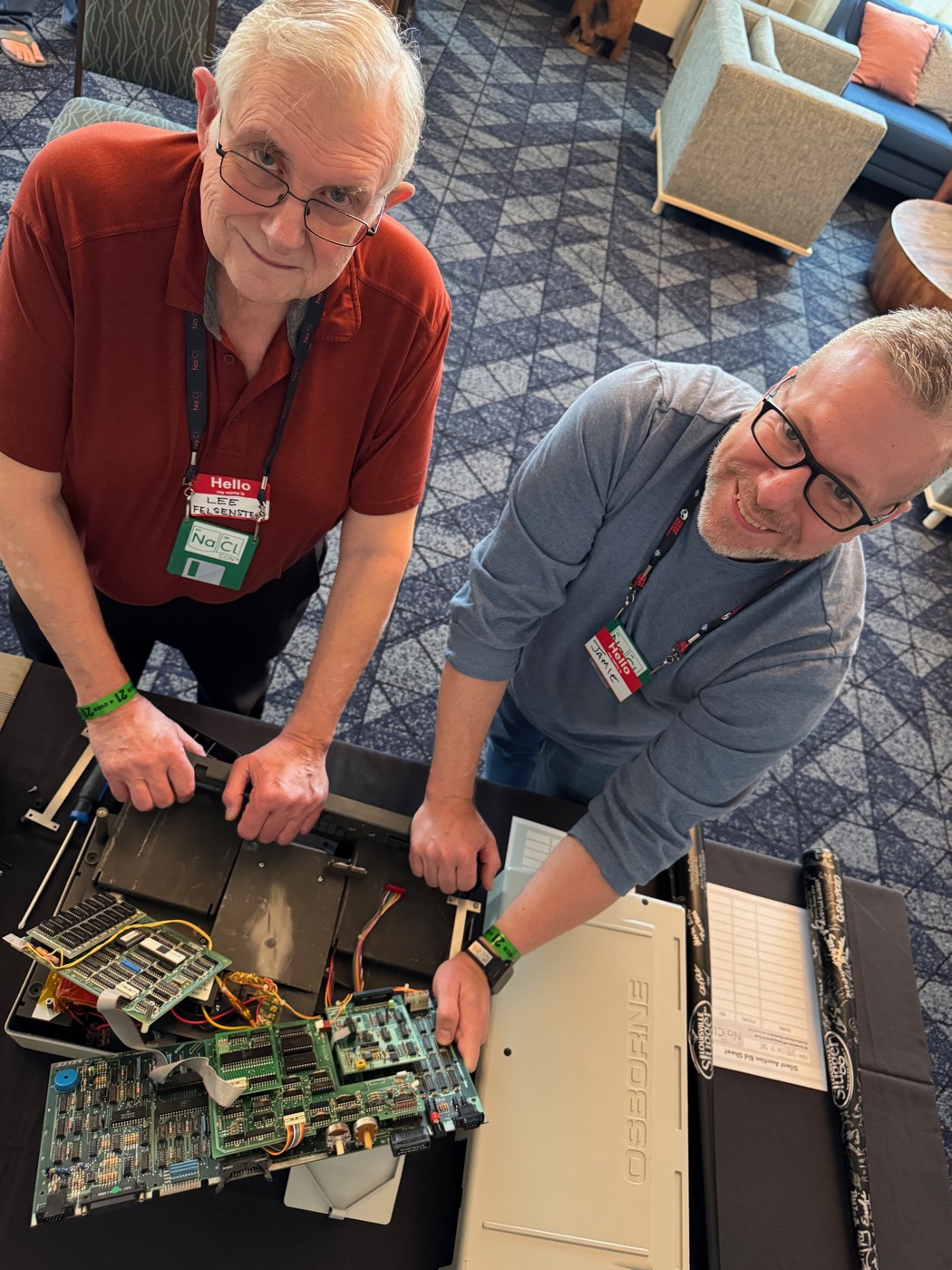
In anticipation of that moment, I pulled my Osborne 1 off of the shelf and started messing with it, this culminated in Osborne Presenter - a full presentation package – basically Powerpoint for 1981 - and then a highly modified Osborne 1 with batteries and an HDMI output rocking the stage at the conference.
I did use AI to help with the creation of o1prsnt - in part because I’ve never actually been a very good programmer, but also because I firmly believe in the theory of Rubber Ducking. It’s just different when your Rubber Duck talks back. I’m pretty sure I could’ve gotten something working in time, but I know that the process of working with the AI to figure that out was beneficial. The AI didn’t write the code - heck, it couldn’t even write functional code at first! I chose MS Basic (mbasic) because that’s what I was most comfortable remembering from over 40 years ago and I thought it would be well within the capacity of the AI. It was not! From hallucinating the existence of commands through failing to understand that line numbers were absolutely necessary, the first few days of that project were difficult. But through that process, I learned a lot about how to effectively use AI as the augmentation for my own brain.
In any case, the project came to a successful conclusion, I got to meet Lee and we had an absolute blast disassembling my Osborne 1 and talking about the hardware side of things. I’ve since used the same software, even extending it, for other talks and it’s always a thrill to watch as people born long after that machine was created really think hard about how to live inside severe limitations.
The Fleet.
One of the things that happened in the preparation for meeting Lee was that I ended up acquiring a couple more Osborne 1 machines - Facebook Marketplace definitely smiled on me. The fleet of Osbornes now includes:
- Original - my actual Osborne 1 from all those years ago. It’s an OCC1A (the blue and grey one) and has the double density floppy upgrade. This machine also now carries the signature of the designer on the outside of the case!
- Single - the first machine I got on Marketplace. Spent $300 on it and it does not have the double density upgrade, although its CRT is in better shape than mine. One drive needs some help, but it’s in ok shape. I don’t regret it as the CRT was transplanted into Original.
- Max - this one is a giant wtf and also wow. Again, Marketplace to the rescue. It was listed as an Osborne Executive in working condition for $200. I did not think there was a chance that this was valid - I’m not sure any Osborne Executives ever made it to Canada but what the heck, worth a try! As we were meeting up, of course I couldn’t tell if it was an Executive or not - there’s only one external sign that tells the difference between a 1A and an Executive (fan in the handle area) - but as he set it down… it was definitely a 1A. I threw it on the hood of my car and opened it up - definitely a 1A BUT it had the tell tale RCA jack added to the front panel. The RCA Jack… that probably meant that it had one of the 80 column upgrades. I kept my anticipation on the inside and headed for home. Once at the kitchen table, I pulled the front panel off and it definitely had one of the additions in there - the right side was a stacked set of boards. But the left side had a triple stack of boards. That shouldn’t happen. What was going on there. It was late at night so I put it down for a proper investigation in the morning.
What the heck is THAT?
Yeah. Something was definitely going on. I carefully extracted the circuit board stack.
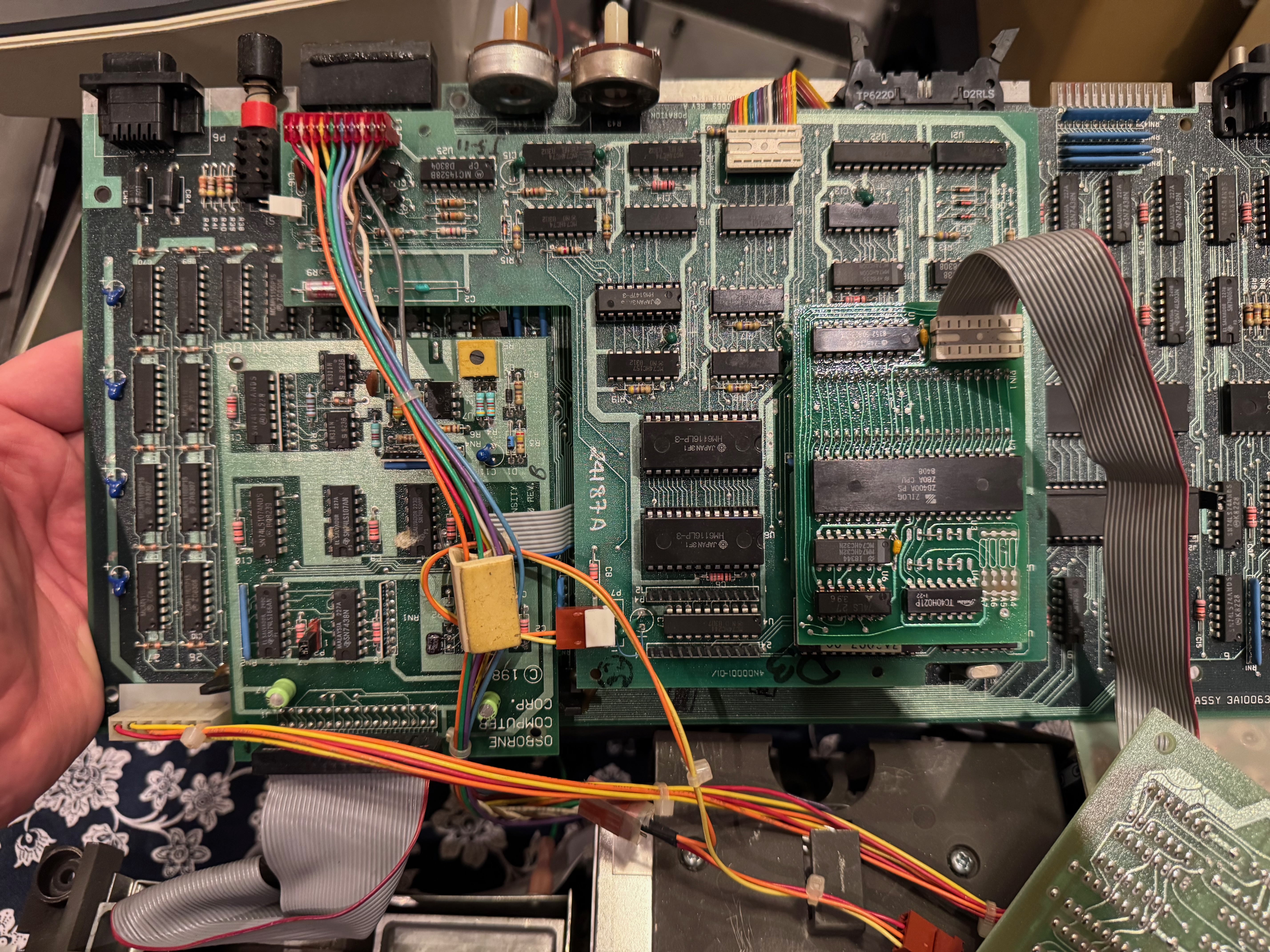
Click the photo for the full 5712×4284 if you want to read the part numbers.
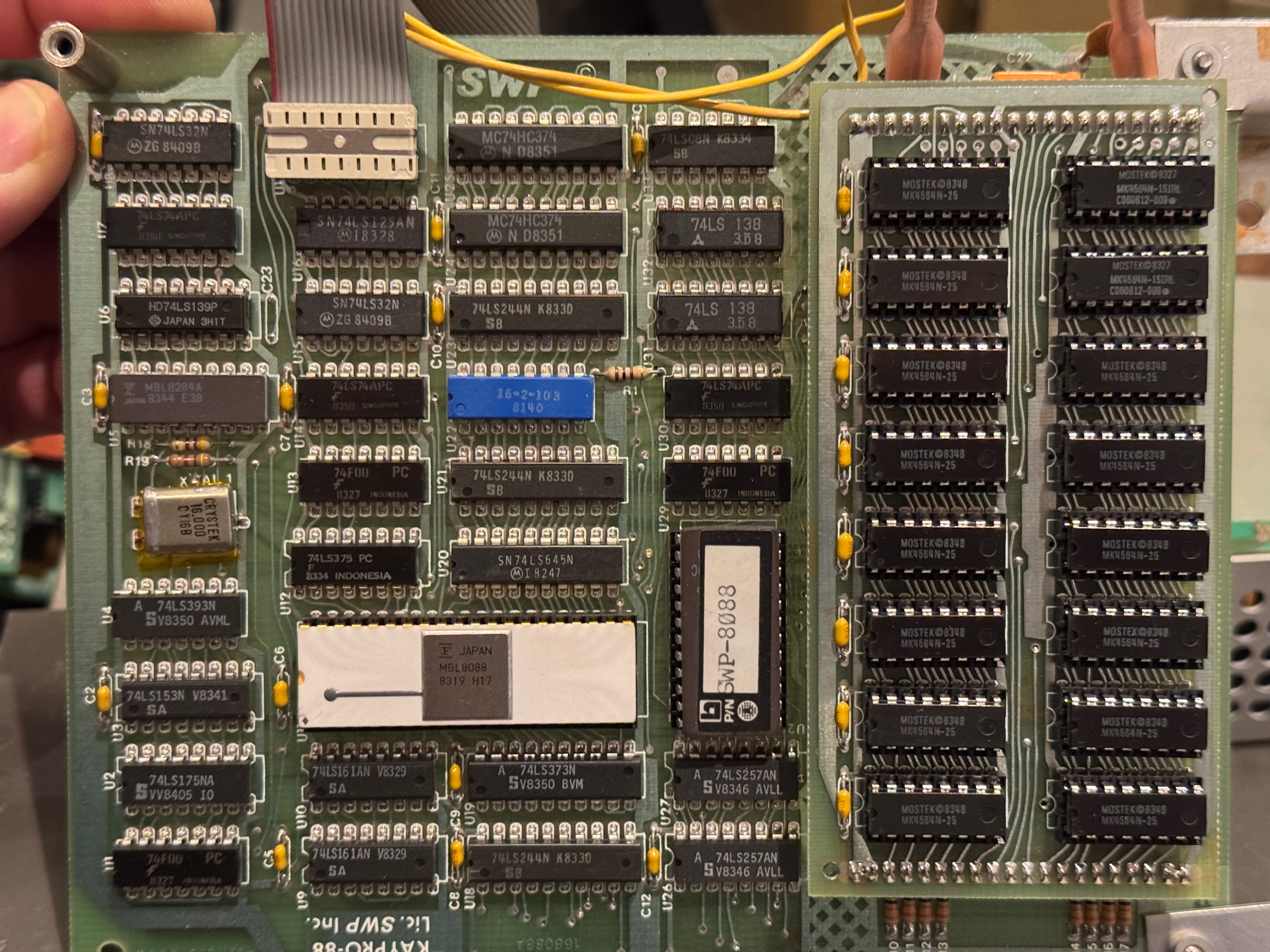
Click for the full 4032×3024.
I was looking at an Osborne 1 main board, the double density upgrade, and the SCREEN PAC 80/104 column upgrade. Together, the double density and SCREENPAC covered about half of the main board. Ok - cool. These are things I understand. But stacked on the SCREEN PAC was an additional interposer card that connected via a ribbon cable to a board that covered the other half of the main board and itself had a stacked daughter card. Looking closely, I was staring at 256kb of RAM, and… an 8088??? Wait - did I have an Osborne 1 with a IBM PC grafted onto it?
Yes I did. It was the SWP CoPower88 board with the upgrade to 256kb of RAM.
I frantically searched through the diskettes that were in the storage pockets and not one of them had any sign of the SWP software. The search moved to the internet… and nothing. Software for the Kaypro (Kaypro shipped an SWP-equipped machine from the factory) and the Zorba, but nothing for the Osborne.
Stuck. Just stuck. I had the hardware but not the software. And like I said, I’m a terrible programmer - no way I was going to be able to get this working on my own.
Augmentation.
In 2026 though, it can sometimes be enough to know what to do even if you don’t know precisely how to do it. I do know how things work from a handwaving perspective, just not the details. So I used the AI.
It started with “how do I give you insight into what’s happening on a 45 year old computer?” and we proceeded through a whole process of building out a headless MAME testing harness that you can find in Headless Testing Harness for the Osborne 1 which will let you drive an emulated Osborne 1 with a Lua script. This works well for for the emulated hardware, but if I wanted to reverse engineer how to use my SWP CoPower88 board, I needed to give the AI access to the actual hardware.
I know that many of the Z80 machines were expandable via interposers (basically interrupting every pin of the Z80 on its way to the machine’s mainboard) and this is how the SCREEN PAC itself works. Could I create an interposer that would give the AI access to all of the Z80’s pins? Since I’m much better at hardware than software - of course that part is do-able.
Research.
This is a real case of where the Rubber Ducking works. I got all of the information I could on hardware extensions to the Osborne 1 – driver software, schematics, manuals – and worked through theory of operation and specific details for each of them until we had a decent understanding of the possibilities.
Following the best patterns of “show your work”, all of this is recorded in the repo - both the research materials themselves in Research and a lot of the discussion and process in Issues. Important too is the fact that I’m standing on the shoulders of giants here and the provenance of all research materials is recorded with them as well as the Inspired By. I expect both of these sections to grow as I work through this project.
There are a lot of retrocomputing projects that use things like the Raspberry Pi Pico (RP 2040 / RP 2350) or ESP32- variant microcontrollers to substitute for actual hardware. The easiest way to give the AI access to the Z80 is to use a Pico so let’s figure that out.
The interposer will let the AI interrogate the computer and due to a fantastic quirk of the Osborne 1 design, its going to be even more effective that I first thought.
Memory.
I’m likely to do a poor job of explaining this despite how clear it is in my mind. I apologize in advance. The Osborne 1 uses no custom components. None. And all of the peripherals (ALL) are mapped into memory. This means that all of the hardware interactions the machine has are effectively PEEK and POKE operations - just read from this location and write to that location - whether it’s a serial port, the keyboard, or video. The only thing that you need is the right hardware configuration and one of the Osborne ROMs.
The software from the CoPower88 on the Kaypro and the Zorba showed that there is a stub ROM on the expansion board that communicates via a mailbox memory location with the Z80 and the Z80 runs code that translates between the needs of the 8088 and the physical peripherals. On the Osborne, this is going to just be formatting and moving from one memory location to another. Simple-ish if you know how to do it, and I definitely don’t. But my exocortex does just fine.
Scope Creep.
As usually happens to me, one idea turns into the next. If we’re going to make hardware that can just sit on the Z80 bus and do memory translation, why can’t we imitate any of the hardware extensions that existed before by examining how their driver software works and just “being what was expected”. This pattern is well established - the C64 Ultimate gives you literally every possible peripheral for the equally venerable C64 - why can’t I have the same nice things for the machine that got me started?
Dammit. Yes we CAN.
Enter the “personalities” – things that can be done once you’re dropping a (relatively!) super computer into your vintage hardware. Why install a GoTek (or two) when you can just run some firmware on a Pico and have a floppy drive. 182kb not enough - want a hard drive? There’s two different ways to get one - because we have two different drivers available! Miss your old Epson MX80 printer? I certainly do - so why not have one that spits out PDF files? Something that would’ve been REALLY helpful when I was making the last round of changes for Osborne Presenter, I needed a timer and the Osborne doesn’t have a real-time Clock, but there was one made and we have the manual with a complete theory of operation (but a busted driver disk) so we can just add that to the firmware. If we continue to follow the pattern of the C64 Ultimate, we’ll just add an ESP32 to get wireless access to the system - a fileserver for disk images, a place to pick up the PDFs from - wait - if everything is memory then I get video and keyboard across a web interface! And of course, modem - this thing is going online! And even more obvious, the SCREEN PAC personality and an HDMI port!!
Think Bigger.
Ok, creep is real. It gets “real-er”. Remember how I said that Lee was very careful to use only the most standard parts? This means we should be able to replicate the mainboard itself. There’s very little that can go wrong with the mainboard - it’s more likely that the mechanical components (CRT and floppies) or the power supply (damn RIFA capacitors) than the chips.
That said, there’s an awful lot of them and they do age.
We can use modern components and side step a few of these issues - SRAM vs. DRAM - and the Z80 is still being made all these years later (albeit as a CMOS instead of NMOS part). So we can build a board replacement that modernizes, especially things like using USB-C power. We’ll need a much smaller PCB - probably two parts, one for the ports and one for the logic - or just one shaped like a hockey stick. It should be true to the original, maybe build in the double-density upgrade but leave it to the interposer card to bring all of the advanced features.
Think Smaller / Lighter.
After hauling the Osborne 1 around multiple conferences, my shoulders are feeling it. I’d love a lighter machine! If the original Osborne 1 is the “Large Form Factor”, can I have a Small Form Factor? There are a couple of projects to take inspiration from - both based on a “just use a Raspberry Pi” - an LCD+keyboard translator in a vintage case and a “cyberdeck” version.
I was kind of hoping for the Osborne Executive (but so damn happy to have the CoPower88!) and of course the un-obtainium machines - the Vixen and the Osborne 3. But I can make things now so why don’t I make the Osborne I want.
If I go with the Osborne 3 / Dolch / Compaq “lunchbox” design, I can get the larger screen of the Executive, get the weight distribution right with the batteries opposite the handle instead of next to the handle, I can even use the “backpack” design that Compaq used in a few machines to put a half-height floppy drive as a clip on option.
And most of all, I can integrate everything into a small surface mount board that includes the interposer personalities and builds it all in with a mechanical keyboard and a 3d printed case that adheres to the OCC1A aesthetic rather than the dark grey of the Osborne 3.
Think Faster.
The modern Z80 is available as a 10MHz or 20MHz part. Compared to the 4MHz of the Osborne 1, this represents a real improvement in compute speed.
Except. One of the things that Lee said to me back in June was that “you can tell how many designers worked on a computer by how many crystals it has” - the Osborne has exactly one crystal oscillator and all other timing is derived from it. Because everything is connected, we can’t simply run the processor faster - everything breaks. Well… almost everything.
There is a way that we can double the processor speed to 8MHz if we accept three negatives:
- Physical floppy drives won’t work: our floppy drive personality will still work, but actual floppies would have the timing so messed up that they wouldn’t work at all.
- Timing critical games run too fast: There’s no real time clock, games are usually timed by ‘how many cycles elapse’ so they often become unplayable. Well. There’s only a handful of games for the Osborne 1 we can probably live.
- Serial port is going to get worse: the Osborne default serial is 300/1200 and you can do a minor hardware mod to boost that to 600/2400 but it isn’t actually - due to the way the divider works out, it’s about 8% too fast and you get 650/2600 which often causes issues. Our modem design includes a double-sided buffer to allow for a wild rate on the Osborne side and a tightly clocked rate on the modem side. Since we can handle wild-ness, having it potentially even more out of whack isn’t actually a problem.
So with those limitations in mind, we can do the most awesome 80s thing ever and have an Osborne with a TURBO button!!! Imagine Supercalc twice as fast, terminal programs reliably running at 9600 baud, and a TURBO button dammit!
Smaller / Lighter / Faster.
An augmented Osborne 1 delivered with 100% compatibility (adding the floppy backpack disables the turbo mode), a rich peripheral set, batteries, an 8” screen and a significant weight diet is truly next generation.
At this point, it’s still months away from being real, but it is entirely possible that I manage to ship the O1NEXT as a hobbyist project due to advances in technology and the augmentation of an AI.
Revisiting the Why.
I told Lee that it was a great honour to meet him - he inspired a 9 year old kid to have an entire career and I’m definitely not the only one. For as much impact as Lee had with the Osborne, I think that his Community Memory work (entering public service when I was 15 months old!) and the Homebrew Computer Club is far more impactful. By doing this project out here in the open, I hope to be able to share the ups and downs along with the impact of AI augmentation on projects like this. Information is incredibly powerful when it’s shared and this work is at a level of complexity that is achievable for far more people than would believe they are capable of it.
Mostly I really want to be able to send one to Lee with a second crystal taped to the side of it – it’s still his design and I’m just along for the ride.