
The ports the machine cannot reach
The ports the machine cannot reach.
The Osborne 1 has a hard disk. It arrived in 1984, it is called the MD-10, and it is the reason this project has an emulator machine of its own.
Getting to it took a wall made of two lines of somebody else’s C++.
The wall.
MAME already models three Osborne 1s, and all three of them model the machine’s I/O decode the way the real one wires it: the Z80 only puts two address lines into the bank-switch logic, so the hardware deliberately ignores the top six bits of the port address. In MAME that is one line —
map(0x00, 0x03).w(bankswitch_w)
— with a global_mask(0x03) on top of it. Which means that when the MD-10’s
driver does OUT (30h), the mask ANDs the address with 03h first, the result is
00h, and the write lands on the bank-switch register. The port the driver
needs is not merely unhandled. It is erased before any handler could see it.
That is not a bug in MAME. It is the machine, faithfully modelled. The Osborne 1
really cannot address a device at 30h, and that is why the MD-10 shipped with a
card — a host adapter that sits between the Z80 and the SCSI controller and
does the decoding the mainboard will not.

And here is the same instruction with the card in the socket:

So we built the card into the emulator.
osborne1nx is a fourth Osborne 1 for MAME — a clone of the stock machine whose
Z80 sits behind an emulated card that decodes the full 8-bit I/O address. Below
30h nothing changes at all; from 30h to 33h the card answers instead. It is
not in MAME; it is a patch, and that distinction matters at the end of this post.
It is written as a real MAME machine and a real MAME device, not as a hack,
because the same device is meant to become the RP2354B firmware’s personality on
hardware later. The patch is five files and 704 lines against MAME 0.289, and
tools/emulator-setup/mame-osborne1nx/apply.sh puts it into a source tree and
builds it.
What is measured rather than assumed:
| Check | Result |
|---|---|
| boots the 1.44 ROM and a bootable disk | yes — BANNER: true, A>, screen text identical to osborne1 |
| banking and video unchanged | yes — the boot probe’s output is byte-identical, modulo the machine name |
| the mainboard’s 2-bit decode survives | yes — 00h–03h still bank-switch, 05h/3Dh still alias 01h |
the card owns 30h–33h |
yes — writes there do not bank-switch |
| the MD-10 presence probe | yes — IN (32h) reads 04h; after OUT (32h),00h it reads 00h |
PREP.COM runs unpatched |
yes — main menu, drive-table submenu, and the whole initialize/format flow |
| the data phase | yes — 22/22 checks over INQUIRY, MODE SENSE, READ CAPACITY, READ |
That PREP.COM row is the one that matters. PREP.COM is the vendor’s own 1984
drive table editor, and it is the piece of software that knows what a hard disk
for this machine is supposed to look like. It runs against our emulated card
without being patched, which means the card is behaving like the card.
And then it booted.
The MD-10’s operating system lives on the drive, not on a floppy. The boot read is
a single SCSI command — READ LBA 5, eleven blocks — into 0xC200, followed by a
patch to page zero. After that CP/M is running, at A0>, and typing B: switches
to the drive’s second partition.
Getting there cost two things that had nothing to do with the disk.
The first was a relocation error. The captured operating system was a uniform
relocation of HARDCCP.SPR and HARDBDOS.SPR at a base 0x100 too high — every
address off by exactly one page, which is why it looked like a warm-boot loop
rather than a wrong load address. tools/research/md10reloc.py is the repair, and
it is exact rather than approximate: the image is the vendor’s, moved.
The second was the order of operations in PREP.COM itself. The disk’s first
block carries a label with a partition table in its tail, terminated by a byte of
FF. If you run the partition step before the label step, the table is never
terminated, the routine that walks it walks off the end of memory forever, and it
looks exactly like a hardware failure. It is not. It is a menu item in the wrong
order, and it is now written down.
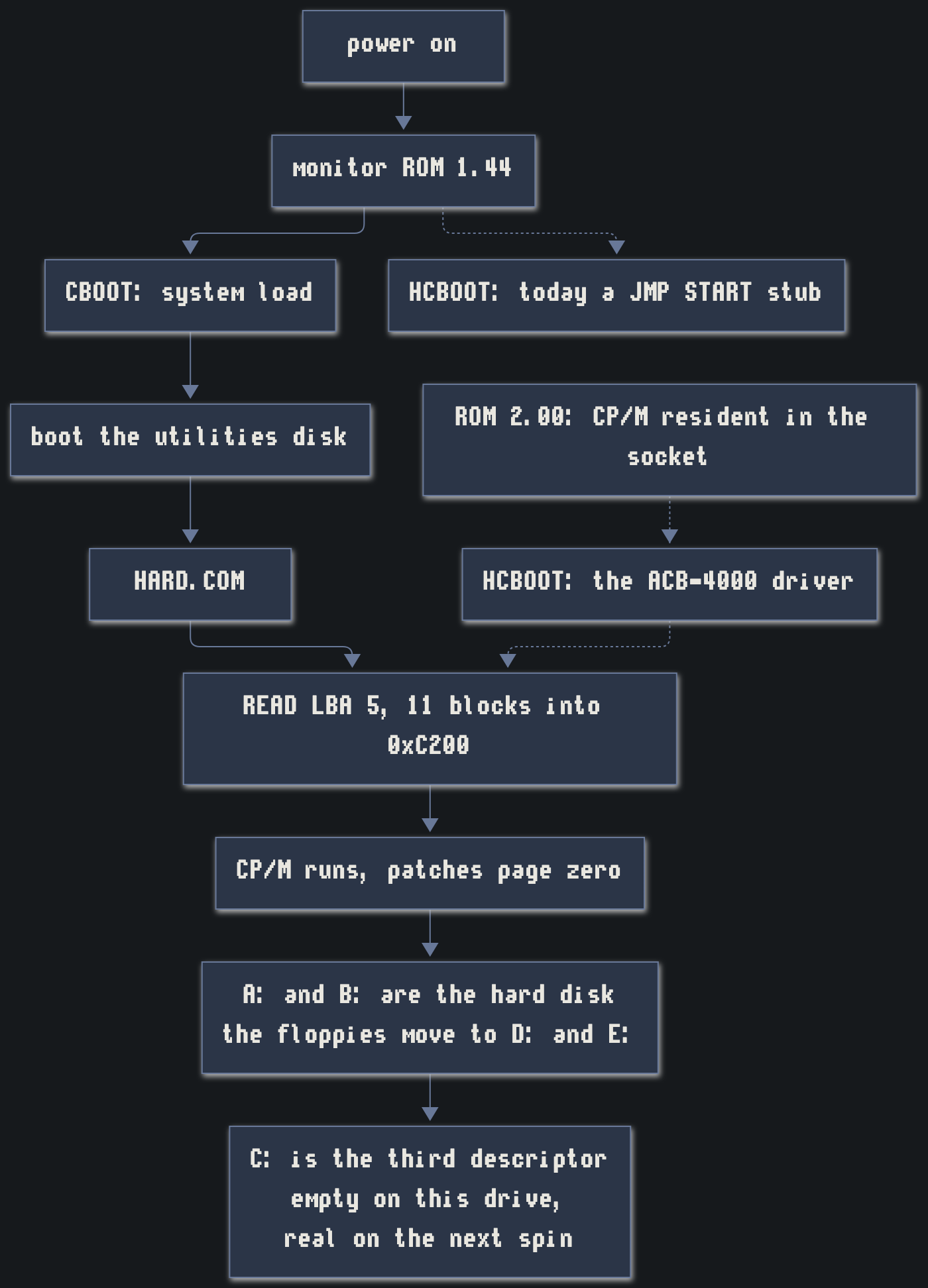
Note the dotted line. HCBOOT is the monitor’s hard-disk boot entry point, and
in the shipped 1.44 source it is a JMP START stub: the vector exists and it does
nothing with it. That is the next step.
And note what happens to the drive letters, because it is the part that
surprises people. The hard disk takes three of them — A:, B: and C: —
because the driver’s type table gives drives 0 to 2 the three hard-disk
descriptors, and the floppies begin at drive 3. So the disk you just booted from
is now D:, and the second physical drive is E:. The relocation is not
cosmetic: from D: the floppy is fully readable, directory and all.
C: is the third descriptor, and on the drive geometry in use it selects and
nothing answers — there is only room for two partitions. That is the one letter
in this diagram that is a promise rather than a description. Put a bigger drive
underneath it — the drive table’s PYXIS27, or any geometry with the room — and
C: is a real drive. Which is exactly where the library goes.
The next step is the ROM.
The MD-10 experience as it stands still needs a floppy. You boot the utilities
disk, run HARD.COM, and that loads the operating system off the drive. It
works, and it is not what a machine with a hard disk should feel like.
ROM 2.00 is the fix, and it is a software problem we already have the parts
for. The goal in #83 is blunt: a ROM that boots to a working A> prompt with no
disk access at all — real or virtual. CP/M itself, resident in the socket, and the
HCBOOT vector carrying a real driver instead of a stub.
Why it is plausible rather than hopeful: we hold the monitor source in full
(rom144.asm, indexed in docs/o1-rom-source.md), the CBIOS source with its
memory layout spelled out (MSIZE = 59, CCP = 0CB00H, BIOS = ccp+1600h), and
CP/M 2.2 itself on the shipped system disks. And OZROM 1E is the existence proof —
a third-party 4 KB ROM that already adds this class of capability, and documents
its own jump table, memory map and error codes while doing it.
How big the part has to be is arithmetic, and the arithmetic is close. CP/M’s CCP and BDOS are about 7 KB, the CBIOS about 2 KB, the monitor 4 KB. An 8 KB part gets you CP/M and a diskless CBIOS; folding the monitor in as well lands nearer 13 KB, which is a 27128. The O1’s BIOS socket is a 24-pin 2732 either way, so there is a daughterboard between the socket and the part no matter which target we pick.
Two questions are genuinely open, and they are the interesting ones:
- Where does the BDOS get its parameters when there is no disk? The disk parameter block, allocation vectors and directory buffer have to live somewhere, and the answer decides whether the ROM keeps floppy compatibility or stubs it.
- Warm boot. CP/M’s warm boot reloads the CCP and BDOS from the system tracks. With CP/M in ROM there are no system tracks, so the ROM’s own jump table has to become the hook.
Neither is a hardware question. Both are answerable in the emulator, this week, which is the whole argument for building the software machine first.
Two machines called O1NEXT.
This is where the naming needs care, because there are two things and only one of them exists.
osborne1nx in MAME is the in-software O1NEXT. It is the specification and the
test bench: it is where ROM 2.00 gets written, where the hard-disk boot gets
proven, and where a change costs seconds instead of a board spin. It has the card
and the full I/O decode, and it will have the ROM.
The physical O1NEXT comes in two boards. The LFF board is a 1:1 mainboard replacement for a real OCC1 or OCC1A chassis — same footprint, same connectors, same four mounting screws, Z80 left socketed so the interposer stays the upgrade path. That is the restoration path. The SFF board is fully integrated and deliberately not a 1:1 swap, and it is the one that is the O1NEXT proper: the interposer’s capabilities grafted in rather than stacked on, an 8-inch panel, turbo, the lot.
(Added 2026-10-19: the 1:1 mainboard replacement is not planned. It was sketched — the LFF board, L-shaped with four screws — and then dropped as a deliverable, so the physical O1NEXT is one board, the SFF. The board register is
hardware/README.md.)
Which means the honest split looks like this:
osborne1nx in MAME |
physical O1NEXT | |
|---|---|---|
| full 8-bit I/O decode, ACB-4000 | yes | yes |
| hard-disk boot, the MD-10 experience | yes | yes |
ROM 2.00 — CP/M resident, HCBOOT real |
yes — and it is built here first | yes |
| the FOG library as a library partition | yes (a file) | yes (onboard flash) |
| floppies | images only | images and a real 5.25” drive |
| SCREEN-PAC 80/104, Nuevo 80-column | separate MAME machines (osborne1sp, osborne1nv) |
on the interposer, alongside |
| RT-60A clock, WiFi modem, virtual printer to PDF, CoPower-88 | no | yes |
| bus analyzer, web-KVM console | no (MAME has its own debugger) | yes |
| turbo, HDMI, the three phosphors, USB-C PD, the detachable keyboard | no | SFF board only |
| anything electrical or mechanical | no | the only place it is true |
So the software machine is not a lesser O1NEXT. It is the half that can be proven without a board, and it is the half that has to be right before a board is worth spinning. Everything in the top four rows is real today or next; everything in the bottom rows is the hardware’s job, and the last row is the one thing an emulator can never do for you.
Why bother.
Because a hard disk makes this machine make sense in a way a floppy does not.
Thirty-five megabytes of a user group’s software library, booting to A> in about
a second, with no disk in the drive and no disk to swap. That is the demo, and the
emulator is where it gets built.
The next post in this thread should be short: ROM 2.00 running under osborne1nx,
HCBOOT doing something, and a C: that is a partition on a flash chip instead of
a .chd file. Everything between here and there is software, and we already know
where the wall is.